

Translating Text to Structured Concepts
There are many use cases that involve a free text narrative or clinical summary to begin the documentation process. But then what? The clinical information in that text is needed for quality measures, HCC analysis, billing, and making sense of a patient’s chart or the history of a chronic disease.
Medicomp Systems’ Quippe platform generates structured, coded data from plain-text clinical notes by combining NLP engines with the MEDCIN clinical terminology and Quippe Clinical Knowledge Graph. NLP performs the initial translation to MEDCIN; the evidence-based clinical knowledge graph then refines those results, removing spurious matches and verifying correct encoding to the data model before anything is returned.
How Text Translation Works
The best way to explain the clinical text encoding process is to use the Quippe demo application in the sandbox.
In the Quippe Ambient UI, start a note for Seymour Patients.
 Step 1: Record the conversation
This version of the Quippe demo application includes ambient listening capabilities. Click the Start Recording button to generate your own example, or load a canned transcript using the Recent Activity icon at the bottom left of the window.
Step 2: Create a clinical summary of the transcript
Click Summary to send the transcript off to the ambient listening tool and receive a free text clinical summary back.
Step 3: Translate the free text clinical narrative to structured MEDCIN concepts
Click Merge to send the clinical summary to the /Quippe/TextRecognition/Recognize API, which uses an NLP engine and the Quippe Clinical Knowledge Graph to extract structured, coded MEDCIN concepts and place them in the patient encounter.
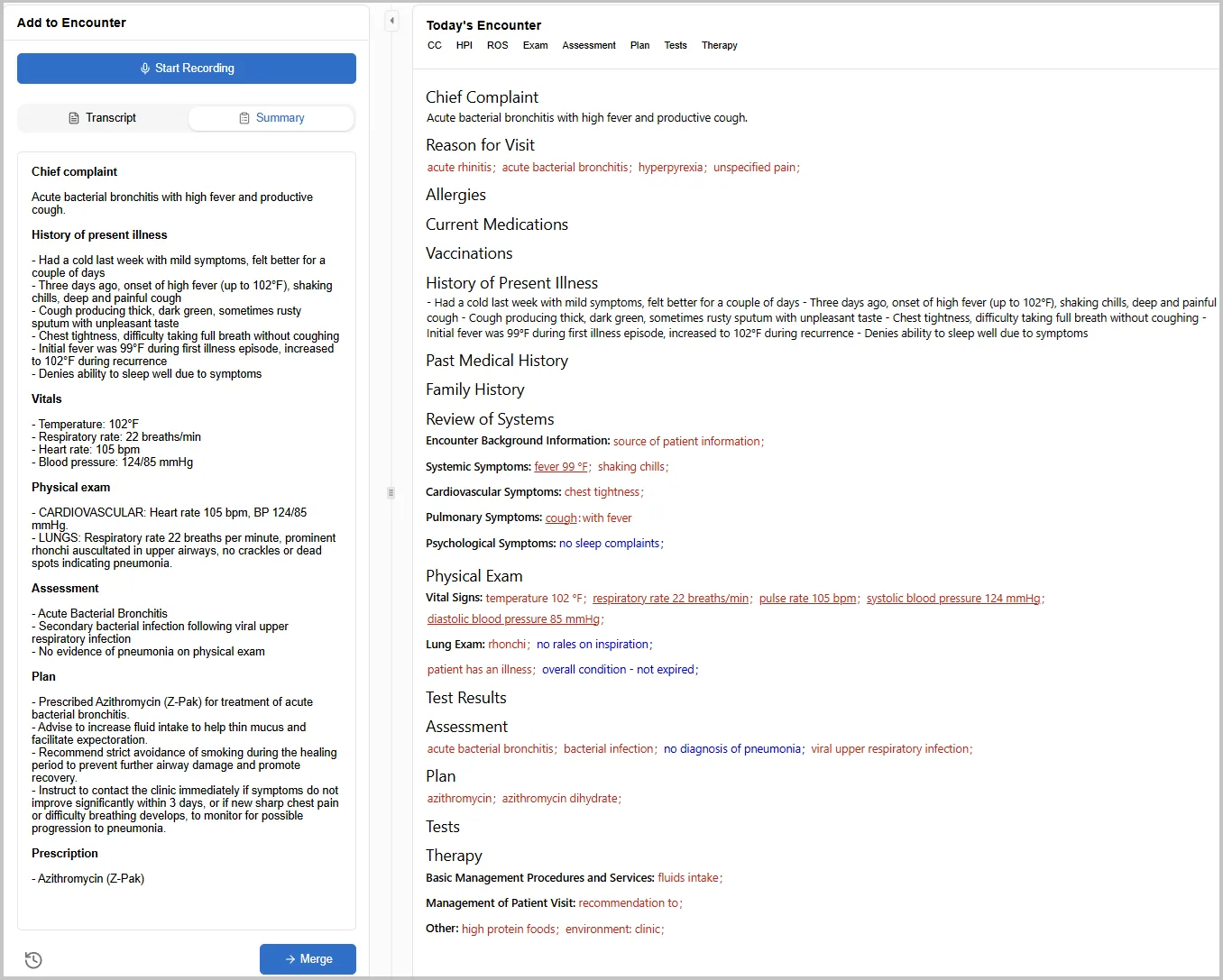 Now that you have extracted structured clinical concepts from the narrative and added them to the note, everything downstream in the clinical workflow is possible:
- Capture medical codes for billing
- Evaluate electronic clinical quality measures (eCQMs)
- Analyze the patient chart for HCCs and care gaps
- Validate AI-generated note for inconcistencies and code completeness
The robust structured clinical concepts extracted using Quippe make free text computable for clinical decision-making, care coordination, and data analysis. Each MEDCIN concept maps to reference terminologies including ICD-10, CPT, RxNorm, SNOMED CT, and DSM-5 — so billing and compliance are more efficient.
Text to Structured Data Use Cases
Overview
The Quippe/TextRecognition/Recognize API returns a “taggedText” object that includes the original source text and all of the findings that were discovered with their locations in the text.
The API makes use of one or more configured NLP engines to do the initial translation to MEDCIN, then makes several refinements using the clinical knowledge graph to remove spurious results and verify proper encoding in the data model.
The resulting MEDCIN data can then be translated into various other coding systems, rendered as a FHIR bundle or CDA document, or used in a variety of analysis tasks.
Translate the Whole Note
You are a clinician and just had a conversation with your patient. Your ambient listening service generated a free text clinical summary. Now you want to extract the findings for the problem list, procedures, and medical codes for billing.
Documentation: POST /Quippe/TextRecognition/Recognize
API: /Quippe/TextRecognition/Recognize
Parameters:
-
Text: The full free text clinical summary -
ResolveFindings: true
Example Input Text:
Sample Results:
Next Steps
Using these results you can:
Organize the returned MEDCIN findings in a note using the various concept properties like term type, section, and group ID
Retrieve the necessary external codes for each finding (ICD-10, RxNorm, CPT, etc.) via the /Quippe/Coding/ChartMap API
Translate a Portion of a Note
You can use the Quippe/TextRecognition/Recognize API to translate a section of the free text note into structured concepts, or to concepts within a specific external vocabulary. In this example, we’ll just extract the problems in the free text note.
Documentation: POST /Quippe/TextRecognition/Recognize
Parameters: Only send a portion or section of the note to limit scope; in this example, translate the Assessment Section:
-
Text: Assessment -
ResolveFindings: true
Sample Results:
Next Steps
Use these results to:
- Generate a problem code set by mapping to standard diagnosis codes for each finding (ICD-10, SNOMED CT, etc.) via the /Quippe/Coding/ChartMap API
FAQ
Why do I need to translate to MEDCIN to get to medical codes?
Clinical named entity extraction through MEDCIN enables you to maintain data fidelity and preserve clinical context within structured, encoded patient data, and leverage mapping crosswalks to 30+ standard code sets and terminologies. The MEDCIN terminology is clinical in nature and purpose-built for use at the point of care. In contrast, most diagnosis and billing codes do not capture the full clinical specificity necessary to drive treatment decisions. MEDCIN supports both needs – precise clinical context, and accurate billing and diagnosis codes.
Is Quippe’s Text to Structured Data feature limited to diagnosis codes?
No, Quippe does more than identify diagnosis codes. Quippe’s Text to Structured Data capability extracts any meaningful clinical concept entered into a patient chart, across every domain of medicine, including (but not limited to) diagnoses, symptoms, physical exam findings, history, nursing documentation, procedures, medications, labs, and genomics — mapped across 30+ standard terminologies and value sets.
Which NLP engine should I use?
Medicomp Systems has partnered with emtelligent for clinical natural language processing (NLP). The Quippe sandbox demonstrates the integration between emtelligent and Quippe in its text recognition capability. Quippe also works with other NLP engines, so you can integrate with the NLP solution that meets your needs.
Resources
API Documentation: